

n8n node
Stop re-running the expensive step.
The Artefaktum node stores a workflow's result under a key. The next run, and other workflows, reuse it instead of calling the API or the model again.
Workflow 1
Stop paying twice for the same API call
What it does
Your workflow calls a paid API on every run, even when it asked the same question an hour ago.
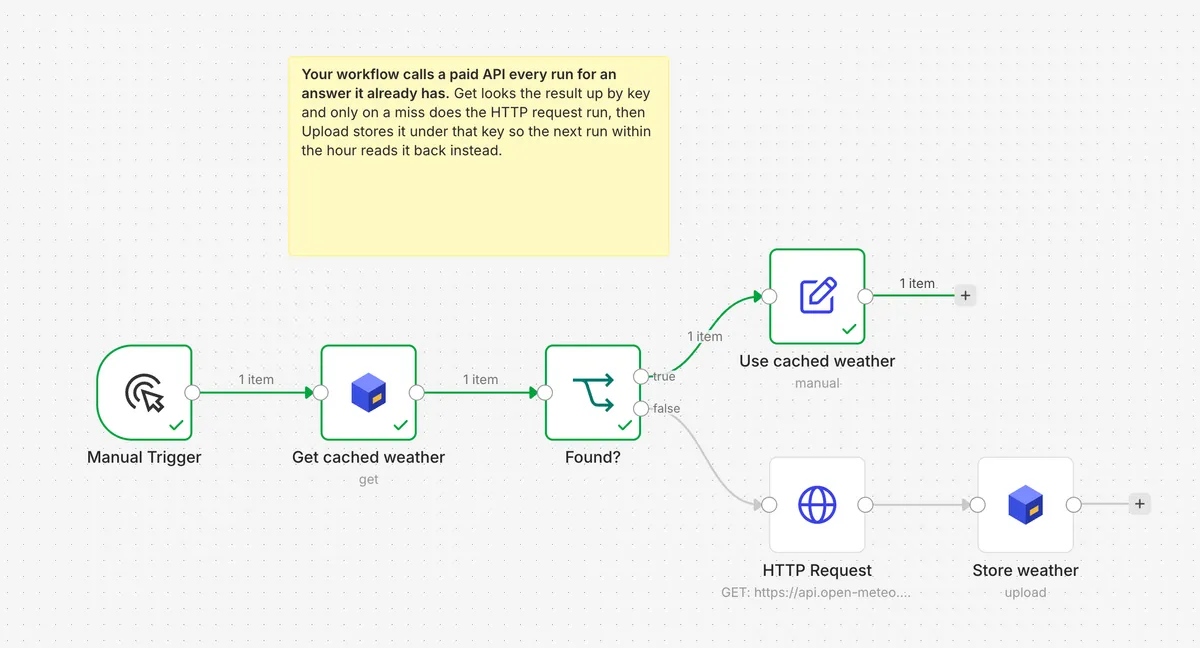
Get cached weather looks the answer up by key. Only when nothing is stored does HTTP Request run, and Store weather uploads the result under the same key.
On the second run Get finds the stored answer, Found? sends it to Use cached weather, and HTTP Request stays grey.
Use it
- Open the template on n8n.io and click "Use for free". It opens in your n8n.
- Pick your Artefaktum API credential on the Artefaktum nodes. The key comes from the console.
- Execute it twice and watch the second run.
Workflow 2
Skip items you've already processed
What it does
A feed or a webhook hands you the same item again and again.
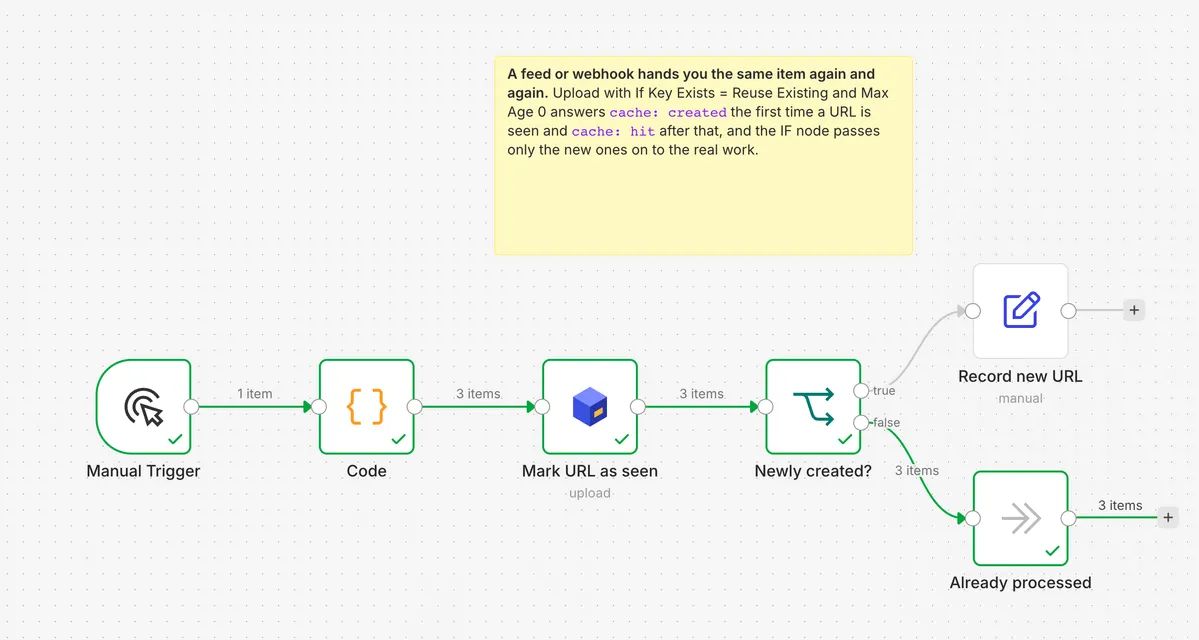
Mark URL as seen uploads under a key built from the URL, with If Key Exists set to Reuse Existing. The first time a URL is seen it answers cache: created, and Newly created? passes it on to Record new URL.
On the second run every URL comes back as cache: hit and goes to Already processed.
Use it
- Open the template on n8n.io and click "Use for free". It opens in your n8n.
- Pick your Artefaktum API credential on the Artefaktum nodes. The key comes from the console.
- Execute it twice and watch the second run.
Workflow 3
Share a file between two workflows
What it does
One workflow writes a report every night. Another needs the newest copy, and nobody wants to pass an ID between them.
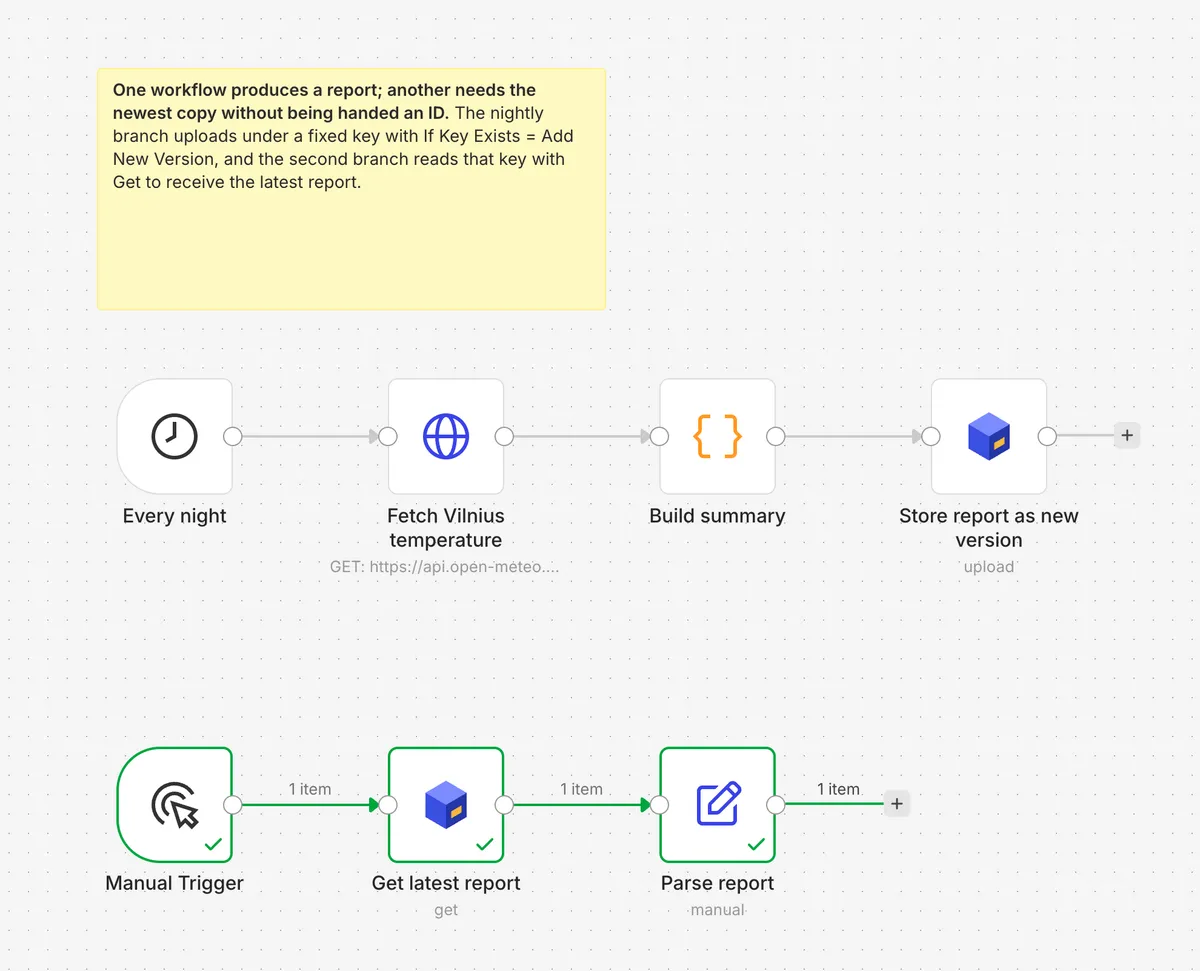
Store report as new version uploads under one fixed key with If Key Exists set to Add New Version. Get latest report asks for that key.
Each night's upload becomes the key's newest version, so Get latest report always reads the newest. The template keeps both chains in one file. In real use they are two workflows.
Use it
- Open the template on n8n.io and click "Use for free". It opens in your n8n.
- Pick your Artefaktum API credential on the Artefaktum nodes. The key comes from the console.
- Execute it twice and watch the second run.
Install
Install it where you run n8n.
n8n Cloud
Open the Nodes panel, search for Artefaktum and install it. The owner does this once.
Self-hosted
Run npm install n8n-nodes-artefaktum, or use Settings → Community Nodes.
The credential takes an API key from the console. Give it the scopes read, write and search.
AI Agent
Give your AI Agent memory.
The node works as a tool for the n8n AI Agent. Give it two: Search, then Get with Output set to Text. The agent finds a stored file by describing it, then reads it.
Get started
Three steps.
- Get an API key in the console.
- Install the node and add the key as the Artefaktum API credential.
- Open one of the workflows above on n8n.io and run it twice.
Free plan: 1 GB storage, 10,000 API calls a month, files up to 100 MB. No card.